

If you have written your academic paper, essays, research report or dissertations then it is crucial that the appropriate formatting style has been followed. The APA title page is one of the more important components of academic writing. When you submit either a college assignment or research paper with an APA title page, formatting it correctly forms a professional first impression.
The American Psychological Association (APA) style is a widely used referencing and citation format in psychology, education, business and the social sciences and many other disciplines. It is the cover page of your paper and contains details about your work.
This comprehensive guide covers what an APA title page is, how to format it, differences between student and professional papers, examples, common mistakes you might make with your title page, and best practices to ensure your paper meets APA formatting requirements.
What Is an APA Title Page?
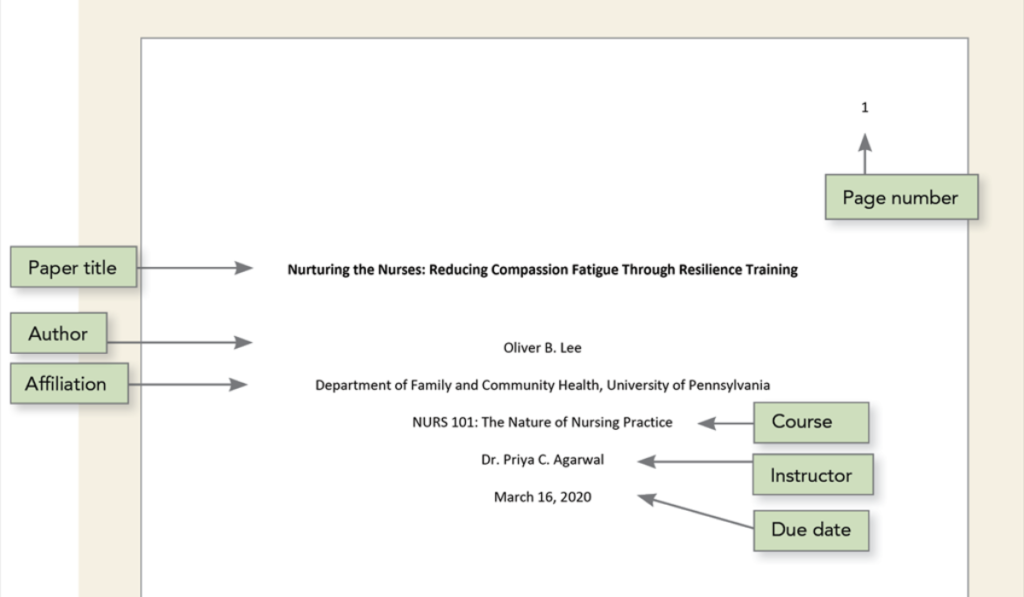
An APA title page is the first page of your academic paper, written according to APA style. It contains important information about the document like paper title, writer’s name, college details, course details, instructor name and submission date.
The title page allows readers to easily see what the paper is about and who it belongs to, while promoting a consistency across academic publications.
Why Is the APA Title Page Important?
The page serves several purposes:
- Creates a professional appearance
- Identifies the author and institution
- Provides course-related information
- Helps instructors and reviewers organize submissions
- Follows standardized academic writing practices
A properly formatted APA title page demonstrates attention to detail and adherence to academic standards.
Page Requirements
APA formatting requirements may vary slightly depending on whether you’re writing a student paper or a professional manuscript.
Basic APA Title Page Elements
| Element | Student Paper | Professional Paper |
| Paper Title | Yes | Yes |
| Author Name | Yes | Yes |
| Institutional Affiliation | Yes | Yes |
| Course Number & Name | Yes | No |
| Instructor Name | Yes | No |
| Due Date | Yes | No |
| Running Head | No | Yes |
| Author Note | No | Sometimes |
| Page Number | Yes | Yes |
How to Format an APA Title Page
Creating an APA page is straightforward when you follow the correct structure.
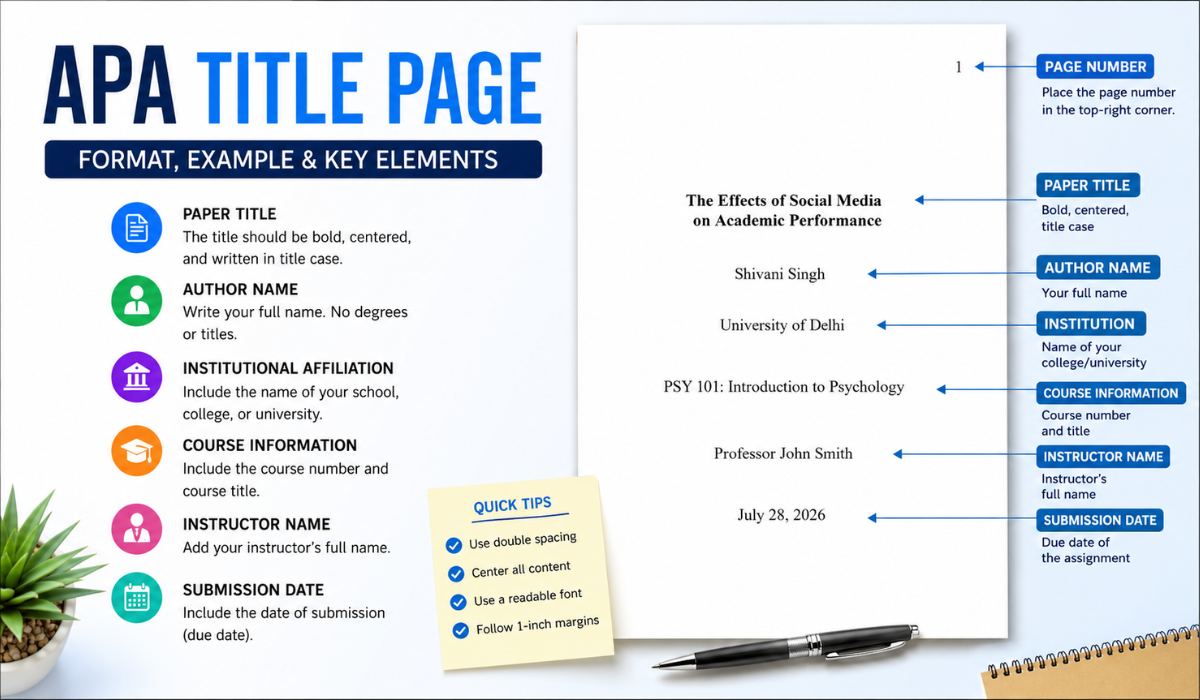
Step 1: Add the Page Number
Place the page number in the top-right corner of the page header.
For most student papers, page numbering begins with page 1 on the title page.
Example: 1
Step 2: Write the Paper Title
The title should be:
- Bold
- Centered
- Positioned in the upper half of the page
- Written in title case
Good Example: The Effects of Social Media on Academic Performance
Poor Example: THE EFFECTS OF SOCIAL MEDIA ON ACADEMIC PERFORMANCE
Avoid writing the entire title in uppercase letters.
Step 3: Add the Author’s Name
Below the title, write your full name.
Example: Shivani Singh
Do not include:
- Degrees
- Titles
- Designations
Incorrect: Dr. Shivani Singh, PhD
Correct: Shivani Singh
Step 4: Include Institutional Affiliation
Write the name of your school, college, or university.
Example: University of Delhi
The institution name should be centered beneath the author name.
Step 5: Add Course Information
For student papers, include:
- Course number
- Course title
Example: PSY 101: Introduction to Psychology
Step 6: Include Instructor Name
Add the instructor’s name below the course information.
Example: Professor John Smith
Step 7: Enter Submission Date
Include the assignment due date.
Example: July 28, 2026
Sample APA Title Page Format
Below is a simple example of an APA page for a student paper.
The Effects of Social Media on Academic Performance
Shivani Singh
University of Delhi
PSY 101: Introduction to Psychology
Professor John Smith
July 28, 2026
Everything should be double-spaced and centered on the page.
Read More: Melanie Nazareth | Blue Mbombo
Student APA Title Page vs Professional Page
Many students get confused about the difference between student and professional papers.
Student Page
Student papers generally include:
- Title
- Author name
- Institution
- Course information
- Instructor name
- Due date
- Page number
Professional APA Page
Professional manuscripts usually include:
- Title
- Author name
- Institution
- Running head
- Author note
- Page number
Professional papers are commonly submitted to journals, conferences, and academic publications.
Formatting Rules
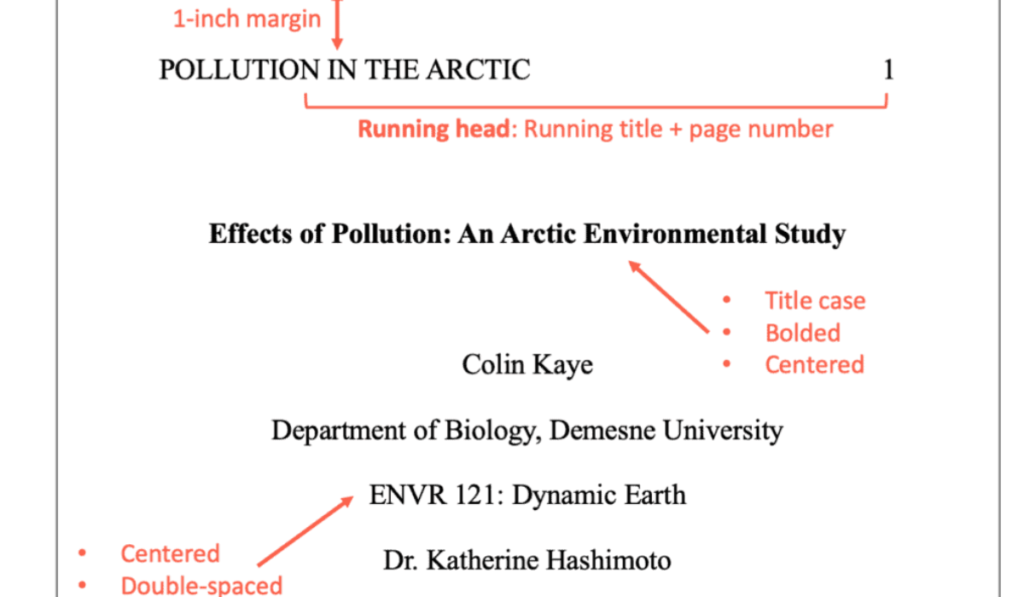
When creating an APA title, follow these formatting rules carefully.
Font
Use one of the approved APA fonts:
- Times New Roman 12 pt
- Arial 11 pt
- Calibri 11 pt
- Georgia 11 pt
Margins
Use 1-inch margins on all sides.
Alignment
Center all title page content.
Line Spacing
Use double spacing throughout the page.
Capitalization
Use title case:
Example: Impact of Technology on Student Learning
Not: impact of technology on student learning
Choosing the Best APA Title
- Clear
- Concise
- Specific
- Informative
Good APA Title Examples
- Effects of Sleep Deprivation on College Students
- Social Media Usage and Mental Health Among Teenagers
- Impact of Remote Learning on Academic Achievement
Weak APA Title Examples
- Sleep
- Social Media
- Learning
Specific titles help readers immediately understand the topic.
Common APA Title Page Mistakes
Many students lose marks due to simple formatting errors.
1. Using All Capital Letters
Incorrect: SOCIAL MEDIA AND EDUCATION
Correct: Social Media and Education
2. Adding Extra Information
Do not include:
- Student ID numbers (unless required)
- Degrees
- Job titles
3. Incorrect Spacing
The entire APA page should be double-spaced.
4. Missing Page Numbers
Always include the page number in the header.
5. Misaligned Text
All content should remain centered.
APA 7th Edition Title Page Guidelines
The APA 7th edition introduced several updates compared to earlier versions.
Key Changes
| Feature | APA 6th Edition | APA 7th Edition |
| Running Head for Students | Required | Not Required |
| Student Title Page | Limited Guidelines | Detailed Guidelines |
| Fonts | Limited Choices | Multiple Approved Fonts |
| Author Note | Common | Mostly Professional Papers |
These changes make formatting easier for students while maintaining academic consistency.
Tips for Creating a Perfect APA Title Page
To ensure your APA title page is accurate:
Keep the Title Concise
Aim for a title that clearly explains the topic without unnecessary words.
Follow University Guidelines
Some institutions may have additional requirements.
Proofread Carefully
Check:
- Spelling
- Capitalization
- Alignment
- Dates
- Names
Use APA Templates
Templates help reduce formatting mistakes.
Benefits of Following APA Title Guidelines
- Improves academic presentation
- Enhances readability
- Demonstrates professionalism
- Meets university requirements
- Reduces formatting-related deductions
A properly structured title page sets a positive tone for the rest of the paper.
Conclusion
The APA Title Page is an important element in academic writing. Its main purpose is to deliver essential information about your paper in a consistent and professional manner. V. APA Formatting Guidelines for Title, Author and Page Numbers Those using APA formatting should pay attention to details on spacing between lines, where your title goes, which author details are important and how pages will be numbered.
Whether you are working on a class assignment, thesis, research paper or journal articl understanding how to format the APA page will ensure your work meets academic standards and is presented clearly. Always check with the most up-to-date APA guidelines and verify formatting before submission.
FAQs
1. What is an APA title page?
An APApage is the first page of an APA-formatted paper containing the title, author name, institution, course details, instructor name, and submission date.
2. Does APA 7th edition require a running head?
For student papers, a running head is generally not required. Professional papers may still require one depending on publication requirements.
3. How should an APA title be formatted?
An APA should be bold, centered, written in title case, and placed in the upper half of the title page.
4. What font should be used on an APA page?
APA allows fonts such as Times New Roman 12 pt, Arial 11 pt, Calibri 11 pt, and Georgia 11 pt.
5. Can I include my student ID on an APA page?
Generally, student IDs are not included unless your instructor or institution specifically requests them.